What Equipment Do I Need To DJ At A Club?
by Dave Fox
Over 70 percent of aspiring DJs walk into their first club audition without a clear picture of the equipment needed to DJ clubs at a professional level, and venue promoters notice within minutes. Whether you're chasing a residency at a local venue or stepping into a festival-sized room for the first time, your gear setup determines whether the night runs flawlessly or falls apart mid-set. Getting booked consistently depends on arriving prepared, and our music gear guides cover every piece of kit that serious DJs rely on to keep a room moving from open to close.
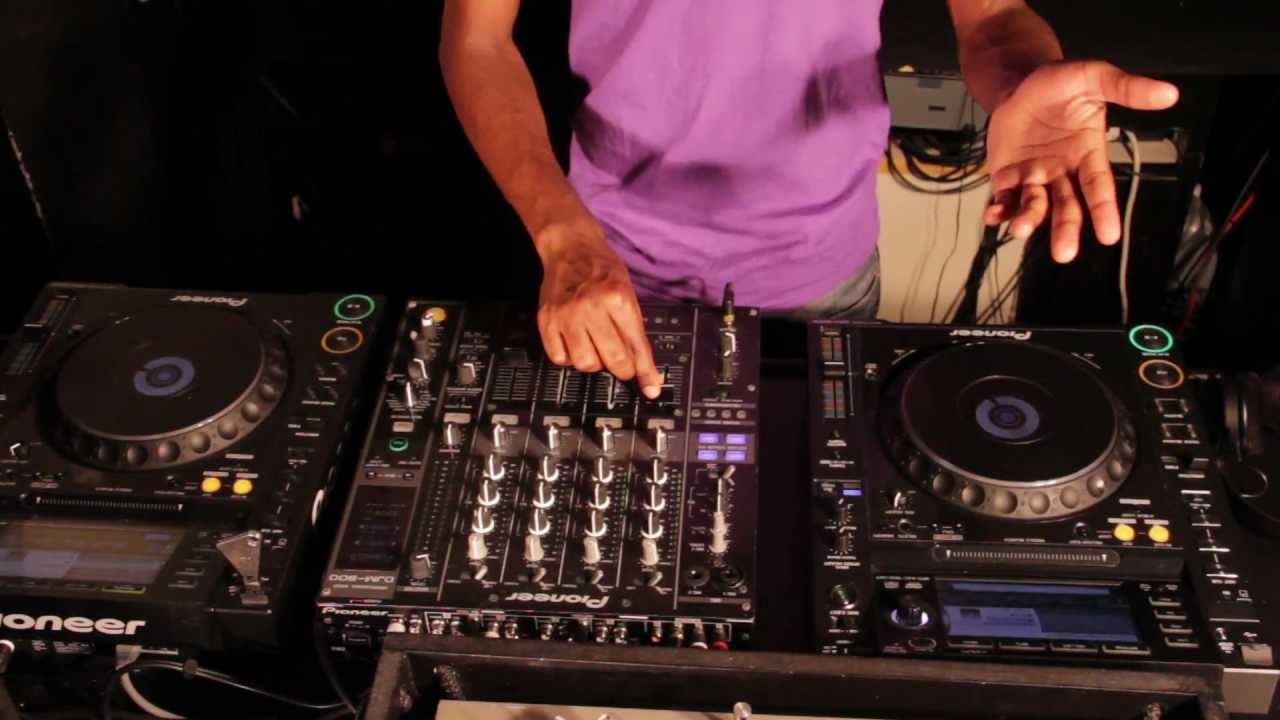
Club DJing operates in a completely different environment from bedroom practice or house parties, where a laptop and a basic controller might carry you through the night without anyone noticing the rough edges. The moment you plug into a professional sound system, every weakness in your setup becomes amplified — literally — because club speakers expose signal problems, timing gaps, and gear failures that home monitors quietly hide. Clubs expect you to arrive knowing the standard rider, understanding what the venue provides, and having your own critical gear ready when the house setup falls short of what you need.
The core rig is more streamlined than most beginners expect, and you don't need to own every piece of hardware on the market to perform confidently at a professional level. You need the right pieces, chosen with your playing style firmly in mind, maintained consistently so they never fail you under pressure. The sections below walk you through the complete picture — from comparing hardware options side by side, to protecting your investment over the long arc of a DJ career.
Contents
Club DJ Gear Compared: Finding the Right Setup for Your Style
Controllers vs. CDJs: The Club Standard Debate
Two dominant hardware paths define the equipment needed to DJ clubs at a professional level: DJ controllers and CDJ setups. Controllers bundle jog wheels, faders, and an audio interface into one self-contained unit, making them portable and cost-effective for DJs who carry their own full rig to every show. CDJs — particularly the Pioneer CDJ-2000NXS2 — are the global club industry standard, meaning most venues stock them on the rider and you simply need to show up with a USB drive loaded with fully analyzed tracks and be ready to perform.
Understanding which path suits your current career stage saves you from expensive, avoidable mistakes that slow your progress. Controllers make sense while you're building your skill set and playing smaller venues where you supply the complete rig yourself. CDJs make sense the moment you start playing clubs with any regularity, because fluency with the hardware translates directly into more confident, expressive performances on any club setup you encounter. Many working DJs own a controller for home practice and invest time specifically in learning CDJs so they're ready for any professional environment.
| Gear Type | Typical Cost | Club Rider Availability | Best For | Key Limitation |
|---|---|---|---|---|
| Mid-range DJ Controller | $400–$900 | Rare | Bedroom practice, small venues | Must transport; rarely on rider |
| Pioneer CDJ-2000NXS2 | $2,200+ each | Near-universal | Club residencies, festivals | High upfront cost to own a pair |
| Pioneer CDJ-3000 | $2,500+ each | Growing rapidly | High-end clubs, touring DJs | Steeper learning curve on new UI |
| Standalone System (e.g., Rane One) | $1,200–$1,800 | Uncommon | Mobile gigs, club warm-up sets | Limited integration at large venues |
Mixers: The Heart of Your Signal Chain
Your mixer sits at the center of every signal that leaves the booth and enters the club's sound system, which makes it the single most critical piece of hardware you touch during a set. The Pioneer DJM-900NXS2 is so ubiquitous in professional clubs worldwide that learning its layout thoroughly is essentially non-negotiable for anyone serious about building a club career. Its four-channel configuration, built-in effects engine, and Send/Return loop for external effects units cover everything a modern DJ set demands, and club sound engineers know its output characteristics inside and out.
When a venue doesn't specify a mixer on the rider, always ask ahead of time rather than assuming — it's a simple email that protects you from unwelcome surprises on show day. Some clubs run older DJM-800 or DJM-750MK2 units, and while the workflow is broadly similar, the effect routing and parameter behavior differ enough to disrupt a DJ who hasn't practiced on the specific model before stepping behind the decks in front of a crowd.
Essential Equipment Needed to DJ Clubs: The Non-Negotiables
The Core Signal Chain
The equipment needed to DJ clubs breaks down into a logical signal chain that every piece of hardware either feeds into or directly supports. Starting from your source material — whether USB drives, a laptop running Serato or Rekordbox, or vinyl — your signal travels through CDJs or a controller, into the mixer, through the club's DI boxes or patch bay, and finally into the amplifier and speaker system. A failure at any single link in that chain stops the music and empties the floor, which is why redundancy at the critical points isn't optional — it's professional standard practice.
- Two CDJs or a quality DJ controller — your primary playback hardware, the non-negotiable foundation everything else is built around
- A professional four-channel DJ mixer with at least two XLR main outputs wired directly to the club's amplifier input
- USB drives formatted to FAT32 with your full library analyzed in Rekordbox, hot cues set, and BPM confirmed accurate on every track
- A laptop loaded with your DJ software running as a backup playback source, even if you plan to run USB-only through the CDJs
- Quality XLR cables in multiple lengths — clubs have variable booth dimensions, and running a foot short on cable is a preventable embarrassment during load-in
According to Wikipedia's overview of DJ mixers, the fundamental architecture of a DJ mixer has remained consistent for decades, but the digital processing capabilities built into modern units have fundamentally transformed what a solo performer can accomplish live. Knowing your mixer's architecture at a deep level gives you a measurable edge over DJs who treat it purely as a volume knob with some extras attached to the sides.
Headphones and Monitoring
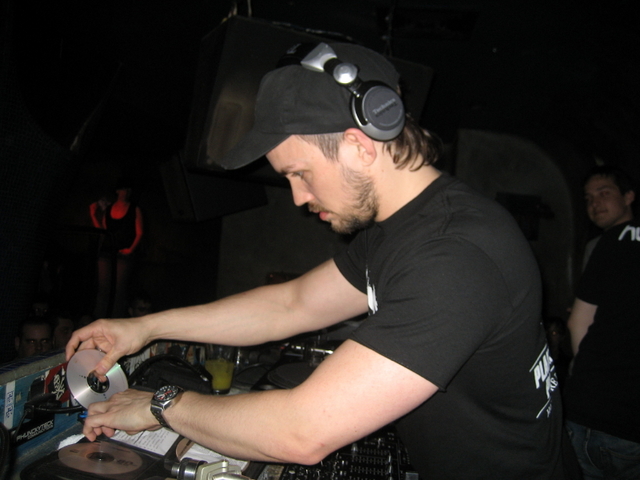
Your headphones function as your private monitoring system inside a room where the main speakers are often loud enough to cause immediate hearing damage if you stand directly in front of them. A closed-back pair built specifically for DJ use — the Pioneer HDJ-X10, Sennheiser HD 25, and Audio-Technica ATH-M50x are all battle-tested choices — lets you cue the next track, match tempos precisely, and dial in EQ levels without relying on what you can hear bleeding through the room's acoustic environment around you.
Always carry your personal headphones even when the venue offers in-ear monitors — club-supplied headphones are frequently damaged or missing drivers, and you won't discover that until you're already standing behind the decks with a crowd waiting.
Wearing DJ headphones correctly takes deliberate practice, because the one-ear-on, one-ear-off cueing technique that club DJs use requires genuine muscle memory before it becomes reliable under live pressure. Our guide on DJ needles for turntable scratching digs into tactile feedback in DJ gear — and headphone cueing works on the same fundamental principle of developing a physical feel for the audio signal before you commit it to the main speakers and the crowd hears it.
Upgrades That Transform Your Club Performance Immediately
Audio Interfaces and Sound Cards
If you're playing any venue that doesn't carry CDJs on the rider and you need to run a controller or laptop-based setup into the club's PA, a dedicated external audio interface dramatically improves the signal quality hitting the main speakers compared to your laptop's built-in output. Units from Native Instruments, Focusrite, or Pioneer's own hardware line deliver low-latency, high-resolution audio that holds up under the gain levels club engineers routinely push through professional amplification systems.
The difference is immediately audible to any experienced sound engineer, and it reflects directly on your professional reputation even if the crowd never consciously identifies the source of the improvement. Club engineers remember which DJs handed them a clean, consistent signal from the start and which ones caused them hours of troubleshooting, and those impressions influence who gets called back for the next booking.
Cables and Connectivity
Cables are the component most likely to fail at the worst possible moment, and they're cheap enough to replace proactively before they become a live problem. Carry spare RCA cables, a pair of balanced TRS-to-XLR cables for direct booth connections, and at least one backup USB cable for your CDJs in every bag you bring to a gig. A small cable tester costs almost nothing and saves you from spending twenty minutes diagnosing a ground hum that turns out to be a single damaged connector on a cable you've been carrying for two years.
- Bring two USB drives loaded with identical, fully analyzed libraries — one is your primary source, one is your emergency backup ready to swap instantly
- Pack a small power strip with surge protection when you're playing venues with older or unpredictable power infrastructure in the booth area
- Carry gaffer tape for cable management at the booth, because unsecured cables get yanked by staff moving equipment around the DJ area during your set
Keeping Your DJ Equipment Stage-Ready Between Gigs
Controller and CDJ Maintenance
Club environments are genuinely hard on gear — smoke machines coat faders and jog wheels with oily residue, drink spillage is a constant occupational hazard, and subwoofer vibration gradually loosens connections and chassis screws over the course of dozens of gigs. Cleaning your equipment after every gig, not just when it visually looks dirty, is the discipline that separates DJs whose gear lasts a decade from those replacing components every eighteen months.
Use isopropyl alcohol applied to a lint-free cloth on faders and crossfaders to break down residue buildup, and compressed air or a soft brush for jog wheel platters and button caps where debris accumulates. If a fader starts scratching or jumping positions inconsistently, clean it before your next gig — don't wait for a full failure mid-set in front of a packed room. Replaceable crossfader cartridges are widely available for most professional mixer models and cost a fraction of what a full service repair runs.
Cable Management and Storage
How you store and transport your gear shapes its lifespan just as powerfully as how you use it during a performance. Invest in proper hard cases or well-padded bags for your controller or CDJs, dedicated cable rolls that prevent kinking and connector stress, and a written gear checklist you physically run through before every load-out. Forgetting a power adapter or your USB drives is a fully preventable mistake that can end a gig before the first track plays, and no amount of improvisation fully compensates for it once you're standing in the booth without your source material.
Building a Professional DJ Setup That Grows With Your Career
Investing in Your Music Library
The equipment needed to DJ clubs matters enormously, but your music library is the other half of the equation — and it's the half that defines your sound and reputation in the long run. A deep, well-organized library that spans the tracks a room needs across different energy levels, tempos, and genre pockets makes you versatile and bookable across a wider range of venues and crowd types. Our full guide to building your DJ music library covers sourcing tracks legally, organizing your collection for fast retrieval under pressure, and metadata strategies that keep everything performance-ready as your library scales into the thousands.
Rekordbox is the standard analysis and organization tool for CDJ-based setups, and learning it comprehensively — setting precise cue points, building intelligent playlist structures, confirming BPM accuracy on every track — is as important as knowing your physical hardware at a deep level. A well-prepared USB drive with thoughtful hot cues set on every track lets you perform more expressively and with greater confidence than expensive gear alone ever provides without that preparation underneath it.
Planning Your Rig for the Long Term
Building a professional DJ setup is a multi-stage process that unfolds over years, not a single purchasing decision you make once and never revisit. Start with the gear that gets you in front of real audiences now — a solid mid-range controller and a proven pair of headphones carry you further than you might expect — then upgrade deliberately as your gig income justifies each investment. The DJs who build lasting careers treat their setup as a professional tool that evolves alongside their work, not a status symbol acquired all at once to signal seriousness before a single club residency is secured.
Focus your budget on the components you actually touch during a set — your mixer, headphones, and playback hardware — before spending on peripheral gear or aesthetic accessories. As your bookings grow and your club experience deepens, the right upgrade decisions become obvious because you'll know precisely which limitations your current rig imposes on your performance and your bookability. That earned clarity is worth more than any purchasing guide, including this one.
Key Takeaways
- The equipment needed to DJ clubs centers on two CDJs (or a quality controller), a professional four-channel mixer, closed-back DJ headphones, and fully analyzed USB drives — master these before investing in anything else.
- Club-standard Pioneer CDJs and DJM mixers dominate global rider specs, so learning them thoroughly gives you a direct professional advantage over DJs locked into controller-only setups that venues don't carry.
- Cleaning your gear after every gig, carrying spare cables, and bringing duplicate USB drives protects your professional reputation just as much as it protects your hardware investment.
- Your music library and Rekordbox organization are as critical as your physical rig — a well-curated, deeply analyzed collection turns any professional setup into a performance-ready system that earns rebookings.


About Dave Fox
Dave Fox (also known as Young Coconut) is a musician, songwriter, and music historian who has been making and studying music across genres for over twenty years. His work spans experimental, jazz, krautrock, drum and bass, and no wave — a breadth of listening that informs his writing about musical history, gear, and the artists who push sound in unexpected directions. At YouTubeMusicSucks, he covers music history and genre guides, musician interviews, and music production resources for listeners and players who want more than the mainstream offers.
Check for FREE Gifts. Or latest free acoustic guitars from our shop.
Remove Ad block to reveal all the rewards. Once done, hit a button below